
Detailing Dimensions Tab
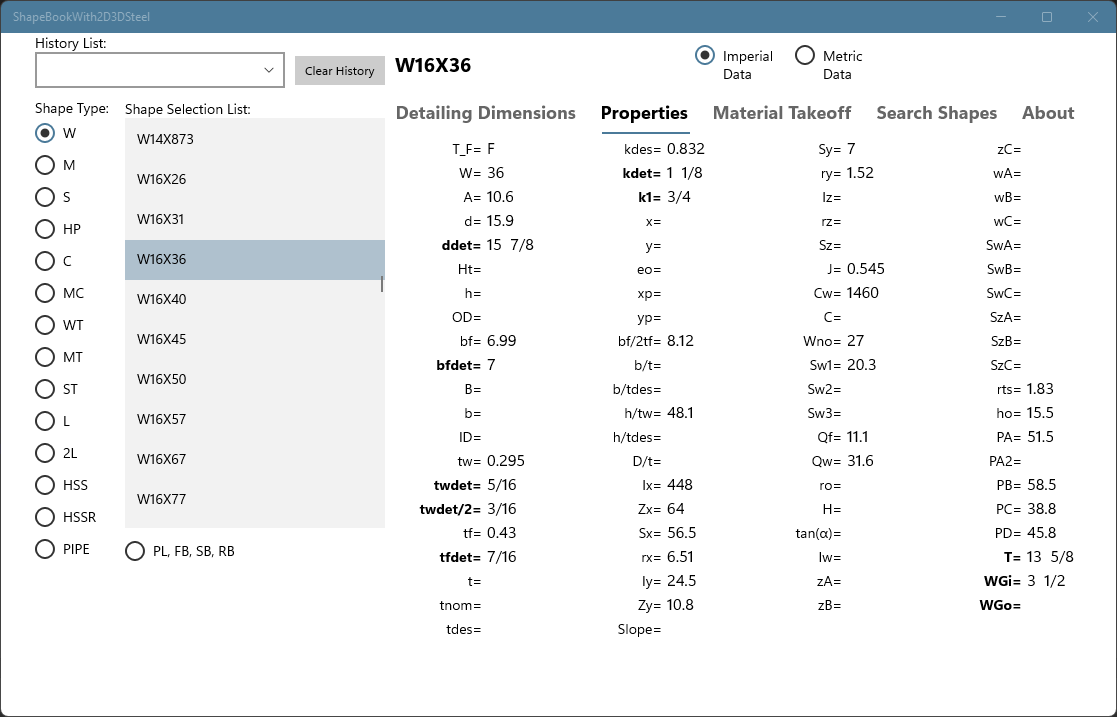
Design Properties Tab

Material Takeoff Tab
Detailing Dimensions Tab
Design Properties Tab
Material Takeoff Tab
ShapeBook is a reference and estimating tool for professionals and students who work with structural and miscellaneous steel. With ShapeBook you can work with shape dimensions and properties, produce material takeoff lists with price extensions for weight and surface area, search for shape sizes with up to 3 property keys providing the minimum and maximum values you need.
ShapeBook is available in two versions. ShapeBook for users on Windows 10 or 11 devices, and ShapeBookWith2D3DSteel for users running AutoCAD on Windows 10 or 11 devices. To download a 30-day free trial visit one of the Microsoft store links below.
The dimensions are shown in a fractional format matching the AISC Manual of Steel Construction and the properties include handy descriptions available by hovering your mouse cursor over a property name. ShapeBook saves your work automatically and opens with your work loaded and ready to continue where you left off.
The shape data in this version of ShapeBook is based on the AISC Shapes Database version 15.0 and is available in US imperial and metric units consistent with the American Institute of Steel Construction Manual, 15th Edition, plus large pipe sizes, and small bar size materials. Bar sized materials, plate, flat bar, round bar, and square bar do not include all design properties.
Included is the ability to enter plate, flat bar, round bar, and square bar with weight, surface area, and price extensions. The take-off material list will automatically expand and contract in length as the ShapeBook widow size is adjusted. The take-off material lists include a dated title, page numbers, line numbers, and column and row outlines. The material lists can be saved to files and loaded back into ShapeBook or imported into spreadsheet or database software.
You can use ShapeBook for estimating based on price per pound and price per square foot. A method commonly used by fabricators, detailers, and coating professionals.
2D3DSteel is an AutoCAD application that parametrically draws and models steel shapes. It includes many specialized tools for drawing and dimensioning steel details. 2D3DSteel will run in any version of Full AutoCAD. It will not run on the LT versions of AutoCAD. All of the shapes available in ShapeBook can be quickly and accurately added to your CAD drawings. 2D3DSteel has a ribbon, pull-down menus, and 7 toolbars to access 61 powerful new AutoCAD commands for use in your AutoCAD profiles.
2D3DSteel is an AutoCAD VLX application that draws steel shapes and includes many new specialized commands for drawing and dimensioning steel. 2D3DSteel will run in any version of Full AutoCAD. It will not run on the LT versions of AutoCAD. All of the shapes available in ShapeBook can be dynamically added to your drawings or 3D models.
Using 2D3DSteel with AutoCAD, you will have powerful drawing tools to quickly and accurately draw steel details, connections, and model structural and miscellaneous steel framing in 2D or as 3D models. 2D3DSteel has pull-down menus, 7 toolbars, and a new ribbon tab. The list below gives a short description of each of the new 2D3DSteel tool bars.
 New 2D3DSteel Ribbon in AutoCAD
 2D3DSteel pulldown menus in AutoCAD
2D3DSteel Features:
Compatible with Windows 10, 11, and AutoCAD 2000 through 2022 and beyond.
2D3DSteel Main tool bar has six fly out tool bar buttons on it providing access to all of 2D3DSteels' commands on one tool bar to save screen space if needed.
2D3DSteel Settings tool bar controls 2D3DSteel layers, linetypes, centerline modes, node point modes, and dimension text lock colors. This toolbar has two commands for saving and restoring your object snap settings. It also includes commands for fast centerline and node point mode changes.
2D3DSteel Shape tool bar commands draw the shape selected in the ShapeBook dialog as 3DSolids, 2D Cross sections, and 2D Web and Flange Views. New cope commands draw a cope pline that can be used as the end of a 2D member or to cope a 3DSolid.
2D3DSteel Lines tool bar is a powerful set of tools for line work in your drawings. Line commands for the 2D3DSteel object lines, hidden lines, centerlines, and dimension lines. Line commands can also be used to quickly change to a 2D3DSteel layer/linetype setting. All of the commands in 2D3DSteel except for these line commands save and restore your current layer and linetype settings. Commands on this toolbar include drawing offset rows of centerlines, centered rows of centerlines, centerlines at equal spacing, centerlines at maximum spacing, and an intelligent handrail picket tool.
2D3DSteel Holes tool bar has four types of 2D holes, round holes, edge holes, slotted holes, and elliptical holes. Each of these four types can be drawn filled, open, or hidden. 3D Hole command is used to add holes in 3DSolids and the Polyline cut command can change any shape created with a closed polyline into a cut out in a 3DSolid with a specified depth. Two bolt group commands draw a single row of holes and a double row of holes.
2D3DSteel Dimension toolbar includes a transparent command for fast 10 key XX.YYZZ feet, inches, and sixteenths input at any AutoCAD distance prompt, a transparent command for metric input in millimeters at any AutoCAD distance prompt. Special dimensioning commands for horizontal or vertical dimensions with automatic .Y & .X point filters to quickly line up dimension rows, rotated dimension commands that remember your rotation angle, and commands to lock and unlock associative dimension text with text color id for easy member shortening and un-shortening.
2D3DSteel Plate tool bar has five commands for drawing 2D plates are used in addition to the commands on the 2D3DSteel Shape tool bar.
2D3DSteel Drawing Settings are stored in your drawing and are used automatically from drawing to drawing. The default value is 0 for all dimensional input entries that are encountered for the first time. 2D3DSteel saves all of your dimensional input entries. The saved value is offered as the default value for that command input entry until it is changed. All of the default values are automatically saved and then restored in your next AutoCAD session. What this means is, once you enter a hole diameter or slot length etc. that will be the value used when you hit return for the prompts for those dimensions the next time you use that command. If you change a value, that will be the next default value for that prompt.
ShapeBook is installed from the Microsoft Store. You can find ShapeBook and ShapeBookWith2D3DSteel on the Microsoft Store by clicking on the "Get it from Microsoft" buttons below. This opens the Microsoft Store's ShapeBook application page in your browser. You will need to log in using your Microsoft credentials to continue.
A better way to get the ShapeBook application is to open the Microsoft Store application and do a search for ShapeBook. You will find both ShapeBook and ShapeBookWith2D3DSteel in the search results. Please note, there are two different versions of ShapeBook on the Microsoft Store. ShapeBookWith2D3DSteel includes 2D3DSteel for AutoCAD and ShapeBook does not.
Once you are on the store's ShapeBook page, you can proceed with the installation of the 30-day trial. When the trial times out you will need to return to the applications page on the Microsoft Store and make a one-time purchase of the software to continue using it with your Microsoft account.
For ShapeBook Only: $49.99 Get a free 30-day trial or purchase your copy of ShapeBook from the Windows Store. |

For ShapeBookWith2D3DSteel: $99.99 Get a free 30-day trial or purchase your copy of ShapeBookWith2D3DSteel from the Windows Store. |